

The 2-minute Qube! analogy

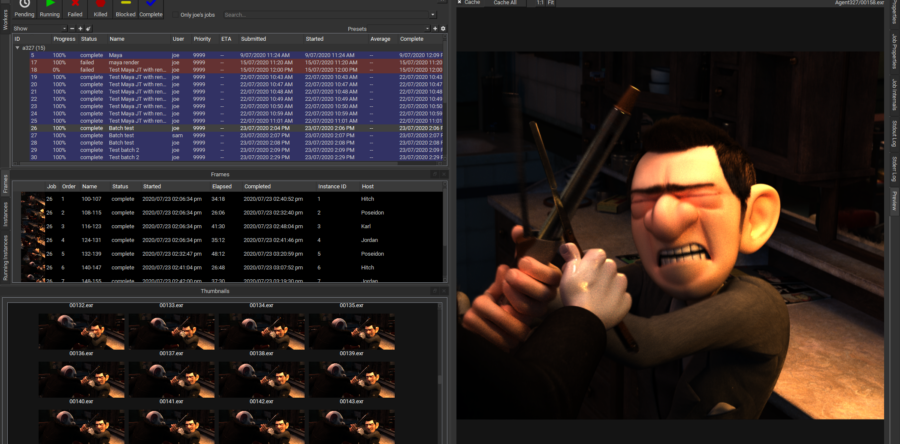
Think of a Qube! job as a blackjack table in a casino.

The supervisor is the dealer, and the pack of cards is the list of frames (the agenda).

The number of subjobs determines how many seats are present at the table. The players in the seats are the workers; actually, if a single worker has 8 slots (worker_cpus=8) and the job is set to reserve host.processors=1, then up to 8 seats at the table can be occupied by that single worker.

Cards are dealt one at at time to each player in a seat; frames get dispatched to subjobs. Once each player processes the card he’s been dealt, he asks the supervisor for another card to play (another frame to render).

You can increase the number of seats at a table while the game is in progress (while the job is running); you modify the job’s “subjob process” count (was called “cpus” before Qube! 6.0), and more empty seats appear at the table. If there are players milling about who aren’t doing anything, and they are capable of meeting the requirements for playing at this particular table (they have the correct app installed, enough RAM, whatever is specified by the job’s reservations and requirements), then they will take a seat and ask the dealer for a card. Now you have more players working through the deck of cards and the entire deck is processed in a shorter time.

Once all the cards have been dealt out, when a player finishes the card he’s been working on he’s told to leave the table, He goes back into the crowd, perhaps to sit at an open seat at another table if one exists.

So if you set the job’s “subprocess count” to 2, only 2 job slots on the farm will be working on the job at the same time; if the job only reserves a single processor (host.processor=1), then both those job slots could very well be on the same machine. If you set the job’s reservations to reserve the entire machine (host.processors=1+, which means “I don’t know how many cores you’ve got, but reserve them all”), then the 2 subjobs will run on 2 different machines. Each subjob will process 1 frame at a time, but you will have 2 frames being processed at the same time, 1 on each subjob.

Posted in Uncategorized | Tagged | Leave a comment

Managing mental ray licenses

16:34:07 (adskflex) DENIED: “85537MAYAMMR1_F” user@host.site.com(Licensed number of users already reached. (-4,342))
16:34:07 (adskflex) DENIED: “85537MAYAMMR1_2011_0F” user@host.site.com (Licensed number of users already reached. (-4,342))

It’s normal with Maya’s network render licenses for mental ray to see “denied” messages. It has to do with the unusual way mental images has implemented counting the floating mental ray network rendering licenses.

An Autodesk customer is entitled to 5 mental ray network render licenses for every floating license of Maya. Autodesk gives you an 1 R1 license, 1 R2 license, 1 R3, 1 R4, and 1 R5 license.

So if you own 7 floating copies of Maya, you will have 7 R1′s, 7 R2′s, etc.
Then, when a machine attempts to check out a license, it first asks for an R1. If all R1′s are in use, a “denied” message appears in the license server logs, and then client asks for an R2. If all R2′s are checked out, the client asks for an R3, etc, all the way up to R5′s. Only if the client is refused an R5 does (or should it) give up and decide it can’t get a license. So, the only ~actual~ “denied” message is when you see a denied message for the 85537MAYAMMR5_F licenses.

If you follow the logs, you will see a single machine initially ask for and get denied an R1, then work its way up the ladder until it either succeeds in getting a license or is denied an R5.

As for the license consumption, Autodesk explicitly does not allow sharing of network rendering licenses on a render node; they say this is to prevent “application servers” with the new machines with high processor core counts.

So if you are running 3 instances of the mental ray render on a single machine, you will see 3 licenses consumed.

With the way that mental ray multi-threads up to around 8 threads, it’s very close to as efficient to render a single 8-threaded render on one machine (and consume a single license) as it is to render 8 separate single-threaded renders (but consume 8 licenses). And the multi-threaded render only consumes a bit more than 1/8 the memory than the 8 single-threaded renders.

To limit the number of concurrent mental ray jobs, define a global resource on your Supervisor and then specify in the job reservation to reserve one of these global resources. Details on how to do this are here.

Posted in mental ray, pipelines, render farms, rendering infrastructure | Leave a comment

The Future of PreViz – MobileViz from Silverdraft Studios

Richard Lewis and Michael Cooper

I recently had the pleasure of meeting Michael Cooper of Silverdraft Studios just prior to their official launch of MobilViz, the “first super-computer-powered digital and visual effects (VFX) studios-on-wheels.” Silverdraft is a Boise, Idaho-based company but their first MobilViz product has been parked in Hollywood behind previz experts The Third Floor for several weeks now in preparation for their launch event.

The vision of MobileViz is to provide a portable VFX studio that is self-contained with a week’s worth of fuel in a generator and every video and audio spigot there is coming out of the truck. Silverdraft designed the truck to contain best-in-class products and technologies in order to support near-real time previz workflows. Silverdraft selected Qube! as their render manager and are running over 1,500 CPU cores in a portable environment!

A recent IndieFilm3D article notes “Software and hardware found within the Mobileviz system include Autodesk MotionBuilder, Maya and 3DS Max; Mental Images’ Mental Ray renderer; Chaos Group’s Vray; Qube! render management from PipelineFX; Apple Final Cut Pro and Avid editing; plus on-set dailies and full color management capabilities. It also has 20TB of Micron solid-state storage.

Look for exciting developments as Silverdraft builds out their fleet of ever more powerful Mobile previz units.

Posted in previz, render farms, Uncategorized | Leave a comment

PipelineFX Forms Board of Advisors

(L-R) Richard Lewis, Phil Peterson, Troy Brooks, Michel Besner

The creation of this Board of Advisors marks a second important milestone in the strategy of PipelineFX in taking render management to the next level. Last year, the company launched their “Smart Farming” technology; a business intelligence system analyzing the power of production pipeline and providing integrated charting and reporting, and automating labor intensive render farm processes. The concept was developed after an extensive product validation process with customers across digital media verticals in major markets around the world. The Board of Advisors will help guide this “Smart Farming” initiative as well as other innovative ideas to deliver never seen before business intelligence solutions for production pipelines.

“We are extremely happy to welcome Michel, Troy and Phil to our Board of Advisors,”  said Richard Lewis, President and CEO of PipelineFX. “Insights and guidance provided by these industry veterans will help PipelineFX extend its leadership in render farm management solutions for digital media creation.”

Michel Besner is currently a business consultant and Executive Chairman of Artfox. He has been successful for more than 15 years in bringing to market innovative products and solutions for mobile, media and entertainment, including OZ Communications, the leading mobile messaging solution provider, acquired by Nokia in 2008. Before OZ, Michel was Senior Director of Product Management at Autodesk M&E. Michel also co-founded and was President and CEO of Kaydara, a pioneer in real-time 3D animation systems for entertainment, acquired by Alias Systems in 2004.

Troy Brooks is currently Head of Studio at Digital Domain Vancouver. He has more than 15 years experience in leading teams in digital media and has served as CEO of PipelineFX, Production Systems Supervisor at Square USA, Pipeline Supervisor at Vanguard Animation and Manager of Production Technology at Mainframe Entertainment.  Troy has also worked as a CG supervisor at Electronic Arts and Head of Engineering for Vertigo Software.

Phil Peterson is currently a consultant in the entertainment industry, where he has more than 15 years of experience advancing technology for animation and visual effects production at leading studios. Phil has held several key technology positions with the Lucas companies including overseeing R&D for Industrial Light & Magic, heading technology for Lucasfilm Animation in the US and Singapore, and as Principal Engineer at ILM. After nearly a decade with Lucasfilm, he joined Digital Domain, where he served as Chief Technology Officer. Most recently, he was SVP and CTO at ImageMovers Digital (a division of the The Walt Disney Studios). Phil began his studio career at Mainframe Entertainment and holds an M.Sc. in Computing Science.

Posted in pipelines, render farms, rendering infrastructure, Uncategorized, VFX Studio | Tagged , , | Leave a comment

China’s BaseFX takes control of their growing render pipeline

This past summer I had the pleasure of participating in a world tour titled “Integrated Pipelines” with the great guys from Shotgun Software and Tweak Software. We visited major 8 cities including Los Angeles, Vancouver, Toronto, New York, London, Mumbai, Singapore and Beijing and discussed CG production pipelines with hundreds of technical folks from hundreds of studios, companies and schools. The last stop on the tour was China.

Integrated Pipelines Tour with Tweak Software and Shotgun Software at Xing Xing in Beijing

PipelineFX has many customers already in China but I had not met BaseFX before. We visited their studio, met Chris Bremble and his team, and re-connected with some old friends from the Square USA days.

Chris is running quite the operation and is expanding rapidly. He has several hundred people and has his own training program to insure quality work. He shared some of their challenges and their current workflow and expressed a desire to raise the efficiency and feature set of many of their tools. They were about to forge into a major Houdini-based project that would require more rendering than anything they had previously attempted. As I unpacked my laptop and iPad for the demo Chris said “I wish someone would connect a render manager to Roambi so I can see what my render pipeline is doing the way I can see my businesses financial data on my iPhone.” I smiled as I turned on the iPad and showed him version 6 of Qube!, and a host of render farm data displayed via the Roambi interface. Things went well from there.

Chris visited our booth at Siggraph between meetings (Chris is one of the busiest people I have ever met). As we finalized our deal for several hundred licenses he commented “You had me at Roambi.” In the end, he purchased Qube! for render management, Shotgun for production tracking and RV for preview/playback. BaseFX’s production pipeline just took a huge leap forward. Chris graciously took the time to talk about his decision in a recent press release.

“We work pretty hard to maximize our resources, and when we looked at our render needs and the options available to us, we realized that only Qube! and PipelineFX had the tools and support to solve the issues we were facing,” said Christopher Bremble, President and CEO of Base FX. “As we’ve taken on more and more complexity in our work, and increased our render times, our needs for additional capacity took us a bit by surprise. We’d relied on internal tools for the last five years, which just couldn’t keep up with our workflow.  We knew we needed to bullet-proof our render management and sought a vendor that not only had an out of the box solution for all the applications we currently use – Nuke and Houdini – but also has integration with our next generation of pipeline tools, RV and Shotgun. Qube!’s new web-based reporting feature with Roambi was also a big plus for us.  I’m data dog, and want to see exactly what’s happening, and the Roambi integration had me smiling in seconds.”

“We’re also really excited about the API, and our ability to take the great platform Qube! offers and make adjustments quickly and easily to match our pipeline.  We have a lot of younger artists in the company, so we’ve scripted checking tools into the pipeline to make sure we’re being smart and efficient.  Qube! has made that process very straightforward.  The support has been amazing.”

Base FX is currently working on projects for all the major studios, including Soul Surfer, Conan the Barbarian, Roadkill, and Boardwalk Empire. The company recently won an Emmy for their work on HBO’s hit series The Pacific, and provided a large number of shots for HBO’s currently running series Boardwalk Empire.

“We are excited to be working with such a fast-growing studio in China,” said Richard Lewis, CEO of PipelineFX. “Base FX has done the work to build a talented team and an efficient pipeline that is paying off in terms of speed of shot turn-around and maximizing artist productivity.”

We also took an afternoon and went to the Forbidden City which was very cool. Unknown to us it was a Chinese national holiday so there were about 100,000 Chinese tourists assaulting the palace that day. Endlesss streams of elementary school children went by smiling and waving at what seemed like the only two Americans on the grounds. Then we walked over to Tienanmen Square. Lot of history there. All in all we had a great time, met a lot of nice people building CG businesses and ate a lot of good food, even if some was quite unusual (solid duck blood, etc…).


Posted in China, pipelines, render farms, rendering infrastructure, Uncategorized | Tagged , , , , , , , , | Leave a comment

The Importance of Rendering in Digital Media Education Programs

At PipelineFX I have made supporting digital media education programs a focus and with over 200 universities and school around the world already managing their rendering infrastructure with Qube! we are making great progress in that area. Many schools are still leaving rendering to be managed by each individual student and using the post-it note method of writing “Stay off my machine! Rendering!” These programs have not yet recognized the importance of rendering in the digital media education process. I’d like to share my views and experience on this subject.

In 1986, while finishing a Bachelor of Environmental Design in Architecture at North Carolina State University, I attempted an independent study using a fancy mini computer, a digitizing table and some alpha solid modeling software donated to the school by a local engineering firm. My premise was that computers and specifically 3D animation and visualization would allow non-design professionals to understand the possible consequences of zoning laws on the built environment. In short, when lawmakers say how dense and how high buildings can be, twenty years later you have certain kind of city. What that city looks like and to some extent “feels” like could be anticipated via computer modeling and simulation.

So focused armed with the energy of youth and a clip board and measuring tape I proceeded to walk 36 blocks of downtown Raleigh N.C., stepping off the foot print of every building, noting materials and colors and guesstimating their heights. Ten class volunteers helped me and after two days of this and 60 pages of notes I returned to the Simulation Lab and my seat at a Cadmus mini-computer and began digitizing the site plan of those same 36 blocks as a footprint for the “as built” version of my Raleigh model. The OS was Unix, the software very simple, and everything was commandline. But the display was a 19” 24-bit color Rastergraphics and after a very slow re-draw the model was coming to life.

First I focused on creating the as-built model, then defining different zoning laws that might be implemented and were reasonable but would clearly result in a different looking capitol city. One was a “high-density on the capitol mall only” set of laws and the other was a “nine-square” rule that spread high buildings out across all of downtown. Then I designed the future cities to follow these rules, as well as take into account real world factors such as existing empty lots, the age of existing buildings and the likelihood of them being preserved for the next twenty years or being replaced.

Now to create these models I needed to “render” still images from different camera viewpoints, checking the colors and geometry of each building and road. In the first month of a four month project the screen re-drew in two to ten minutes. By month three, with all models complete, I was faced with thirty minute screen re-draws, or ‘renders.” Now the deliverable of this independent study was a slide show moving through these different models, allowing the viewer to experience the city of today and two possible cities of tomorrow. With 30 minute renders per camera location, and a desire to have many images to “dissolve” together to simulate animation and movement I realized I would need to almost move into the sim lab and sleep next the system, waking every hour or two to re-position the camera and start another screen render, sleep, wake up, take a photo (yes, 35mm slide film, I know, I know…), move the camera, back to sleep….for two months!

Even to show my professor my work each week was too render intensive to prepare much. I’d have a render done to discuss then move the camera once and we’d talk for half an hour while the screen painted line by line. Even then it was clear to me that once we begin using computers and rendered images as a critical part of a design project, the time to render is THE bottleneck in the review, critique, and re-work cycle. The amount of critical feedback from faculty, peers and even myself was limited by the number of times I could make decisions, implement those decisions in the model, and re-render the necessary images in the time allotted. Any increase in rendering speed would directly benefit the project by providing more opportunity for review, thought and change, resulting in a better overall project and more compelling presentation.

Even given the challenges of early computing hardware and software I was excited about the possibilities of visual simulation in design.  The accuracy, ease of perspective display, and just hi-tech look of the imagery foretold a useful place in any designers toolkit. Today design professionals, post production houses, broadcast television stations, visual effect studios and film makers around the world use computers and software to create, advertise, entertain, inform and amaze their clients and audiences every day.

In the education field computer graphics systems are not relegated to the graduate area of a simulation lab with limited student access. Labs are filled with multi-core desktops running Maya and Nuke, whole Mac labs running AfterEffects, editing labs with Avid and FinalCut, and even dedicated render farms are being built as a shared resource across an entire digital media program. Schools are deploying render management solutions to maximize the use of their computing resources and simplify the use and administration of the rendering process. Advanced render management systems like Qube! allow labs to share resources yet retain priority for their own users, making sure every CPU is processing someone’s project, reducing that creative loop and increasing the overall educational experience of every student.

Another recent challenge is transcoding. Students are beginning to shoot film on digital cameras like RED. To ingest the RED footage can take days on a single machine, and though there are special accelerator solutions the sheer amount of data can still delay time begin editing and review for many hours if not days. Distributing the transcoding across many machines reduces that delay dramatically. Advanced render managers manage the transcoding process as a job the same as any 3D render of 2D composite and divide the work across many computers. Students can begin editing much sooner and can re-shoot parts that require it much earlier.

Render times were the bottleneck to my design project in 1986, and in my opinion remain the primary bottleneck to improving the digital media education experience of students today. HD formats and stereoscopic rendering have recently exacerbated this problem. The good news is that by deploying a smart render manager and harnessing existing computing resources the iterative cycle can be reduced significantly with little expense. Once a program has all of it’s computers working at high utilization rates (which you should know from the reports your render manager provides) then budgets can be planned for a dedicated but shared render farm. It is interesting to note that as of this writing I am finding that China leads the way in dedicated render farms for digital media education, commonly deploying fifty to one hundred or more dedicated rendering servers per school. The Chinese government funds these schools and they run classes nearly 24 hours a day. they have recognized the importance of rendering in the feedback loop of their teachers and students and devote budget and staff to making sure that loop is as short as possible.

As I visit schools around the world this message is well received and changes embraced to improve the iterative cycle and maximize existing investments in infrastructure and computing power. Simply deploying smart render management is a huge step in the right direction.

Posted in education, render farms, rendering infrastructure, VFX Studio | Tagged , , , , | Leave a comment

Building a render farm without a shared filesystem – NOT recommended

This question comes up from time to time.

A potential customer calls our sales department and asks “Can I just install Qube! on our workstations and turn them into a render farm?  We don’t have a file server, we all work off of local disks.”

If your site is running Linux or OSX and you have a limited number of machines (say, less than 10), then you could possibly have each workstation function as a file server.  Each machine would then have to mount all other machines’ filesystems, and the path to any scene or scene component would have to include the machine name.  This gets a bit tricky when the file lives on your own machine; you have to treat it as if it lived on a remote filesystem.  Your machine would have to be configured to mount its own exported filesystem the same way that other machines would mount it.  This is known as a loopback file system, and setting this up is beyond the scope of this post.

I’m going to say that I strongly recommend that you don’t try and run without a central file server if the job content resides on machines running a Windows desktop OS.

Qube! doesn’t have a file transfer agent that would copy files around and you wouldn’t want to add that load to your network anyway.  It relies on the networking setup present at your site.  All workers have to have visiblity into the shared filesystem where the files resides.

While you could set all paths in the project to UNC and include that machine name of the host where the files reside (simulating a loopback filesystem), which would allow all machines to access files on that host’s local disk, Windows desktop operating systems do not support more than 5 connections from remote hosts doing CIFS access (remote machines accessing the local host as a file server).  They’re only meant to share disks with a limited number of machines under very light load; if you’re trying to act as a file server, Microsoft wants you to buy a server OS.

When more than 5 hosts try and access a Windows desktop OS as a file server, the connections from the remote machines are dropped in an unpredictable manner, and are not reinstated.  It will work if you only have 1 or 2 subjobs running at the same time accessing the job content, but as soon as you try and run more than 5 or 6 subjobs at the same time, you’ll get nothing but errors and hung jobs, since the remote workers will either be able to only intermittently connect to the machine where the files reside, or they’ll get a connection that might be dropped in the middle of a read or write request.

Very Bad Things will happen…so just don’t do it.

Posted in render farms, rendering infrastructure, VFX Studio | Tagged , , , , | Leave a comment

RodeoFX benefits from smart render management

Rodeo FX is a Montreal-based visual effects company founded in 2006 by Mathieu Raynault and Sebastien Moreau. Sharing over 25 years of visual effects experience, the partners are known for creating stunning photorealistic and creative visual effects. Recent film projects include Terminator Salvation, Mr. Nobody, Amelia, The Day The Earth Stood Still and Indiana Jones and the Kingdom of the Crystal Skull. When the studio was formed, Rodeo FX was looking for a render manager that could handle a mixed operating system environment. They needed the render manager to work easily with all parts of the software production pipeline. Studio tools included Shake for compositing and XSI for 3D animation and modeling. The system needed to be truly compatible across platforms.

Qube! came highly recommended to us and its features matched up with the demands we had when researching a render manager,” said Curtis Linstead, Systems Administrator at Rodeo FX. Rodeo FX chose Qube! and initially customized the artist submission interface for Shake down to a two click process. For peak periods, Rodeo FX pushes render out to high-end desktops to help get the work done. Qube! is installed on all systems in the studio.

Qube! is great for render management, and I’ve also found other powerful uses for it as a system administrator,” said Linstead. “Since Qube! is installed on all the workstations and all the dedicated render systems I can push out all my software updates and installs to the users without interrupting their workflow. This saves me time and is less intrusive to the artist.”

The studio has recently added Nuke for compositing and now the artists enjoy the same ease of submission they enjoyed with Shake.

With the seamless integration of Qube! with Nuke, Shake, and XSI our render pipeline is really streamlined,” added Linstead. “The in-application submission helps speed things by automatically filling in many of the dialogue entries. Cross platform capability with Nuke has been really helpful. We can send renders from a Nuke-based PC system to a Mac OSX workstation for rendering and vice-versa. No compatibility issues. Jobs just run.”

Rodeo FX has made use of Qube!’s internal database and callback functionality. In computer programming, a “callback” is executable code that is passed as an argument to other code. It allows a lower-level software layer to call a subroutine (or function) defined in a higher-level layer.

We are now leveraging the ability to create callbacks,” Linstead continued. “We render a job, then create a quicktime movie, then create a daily with a slate and finally move it to preview location. This level of render pipeline automation allows us to maximize our infrastructure and automate repetitive processes like dailies.”

PipelineFX has been very quick to respond to all of my support requests,” concluded Linstead. “Support has been phenomenal. Cases get immediately resolved and we benefit from the deep render pipeline knowledge held by the support team at PipelineFX. I look forward to working together as we grow our studio.”

Rodeo FX is a good example of a smaller studio with lots of experience leveraging the best in technology to their competitive advantage. Since our companys’ birth out of the Square Pictures studio in 2002, PipelineFX is proud to be able to deliver large studio features and functionality to digital media professionals around the globe.

Posted in render farms, VFX Studio | Tagged , , , , | Leave a comment

General render farm recommendations

We are frequently asked for general recommendations on render farm hardware and configurations.  While there is no “one size fits all” for render farms we would like to share some thoughts on the subject and welcome your comments.

The first thing you should consider on the workers is the ratio of RAM to cpus (cores, not physical processor packages).  The amount of RAM will determine how many different renders you can run at the same time on a host.

So how many renders do we want to run at once?  Let’s consider a Maya render running on an 8-core worker.

At one end of the spectrum, we could have a single render running 8 renderThreads.  This provides the fastest turnaround for a single frame with the smallest memory footprint.  But a 40-worker farm that has 320 cores will only be rendering 40 frames at one time.  And the end-users will see that only a few frames are being worked on at the same time, so they’ll perceive the farm as being slow.  Never underestimate the power of someone else’s perception to make your life miserable…

But we almost never render single frames.  When rendering sequences, it’s often advantageous to get more frames rendering at once, so that if there’s something wrong in some of the later frames (missing geometry or textures, wrong/old camera or animation) it gets noticed quicker.

The other end of the spectrum would be to run 8 single-threaded renders at the same time on the host.  This gets more frames in progress at the same time, but the memory footprint is almost 8 times larger that the single 8-threaded render.  And running 8 simultaneous renders on a worker puts a large load on the network interface for the host, the network itself, and file servers.  The end-user sees more frame being worked on, so they perceive that the farm is working faster, but it may in actuality be killing the network or file server.

At the end of the day in a perfect world (there was enough RAM and network and disk throughput), it would take close to the same amount of time to render 8 frames at once single-threaded as it would to render 8 frames one after the other with 8 renderThreads.  The 8 single-threaded renders would be ~slightly~ faster.

So the answer lies somewhere in the middle.  2 or 4 renders on a worker is usually a good number for most cases.

If we consider that renders usually run between 2GB and 4GB of RAM, then 16GB in an 8-core box (2GB/core) is always a good starting point.  If your renders are expected to have a much larger footprint, then you would want to buy more RAM.  But don’t plan on running more than 4 renders at once on a host; you’ll just end pushing the system load onto the network or file servers, and that will kill the performance of the entire farm (and probably the workstations, too).

As most jobs on a farm are cpu-bound, it makes sense to buy the fastest processors you can afford.  But often the fastest processors are twice as expensive as the 2nd-fastest.  So the operative word here becomes “afford”.  You’re probably better off spec’ing the 2nd-fastest processors, and being able to buy more blades for the same budget.  It’s always a trade-off, but you don’t want to be the one who paid absolutely top dollar for processors that are only considered “adequate” in 18-months time, when the farm could have been 15% larger during that 18 months.

Buy as fast a file server or Network Attached Storage as you can afford, and put as fast a network interface in it as you can.  Rendering on a farm puts a heavy load on file servers, and Nuke jobs can crush them.  Many nuke jobs are entirely i/o bound; basic ‘over’ composites represent almost no cpu load to the worker, but they can easily saturate the network and file server.

You may want to have the file server/NAS be on 2 subnets; 1 for the workstations and 1 for the farm workers.  This way, the network i/o from the workers will not impact the users’ workstations.

More spindles in the file server or NAS is better than fewer.

Also don’t forget that Qube! can manage available cores on desktop workstations, even while they are used for interactive work. Many studios leverage the un-used CPU cores during the daytime for rendering and greatly increase the overall work capacity of their farm.

Posted in render farms | Tagged , , , , , | Leave a comment

PipelineFX now provides seamless integration with Adobe AfterEffects

PipelineFX, makers of Qube!™ – the leading render farm management software for digital media creation, announced today the addition of advanced features for render management in Adobe AfterEffects. This latest release brings a new level of seamless integration for render management that all AfterEffects users will appreciate.

Some of the new features include:

-       New job submitting workflow similar to the existing After Effects Render Queue

-       Instant feedback on percentage (%) of job completed and listing of rendered frames

-       Automatic path translation allowing seamless use of Qube! across Windows or Mac OS X platforms

-       Zero installation time with enhanced integration through QubeGUI

“With the recent release of Qube! 5.5, we’ve upgraded our support  for Adobe AfterEffects to include the features that many of our post production and visual effects customers have been asking for,” said Scot Brew, PipelineFX Director of Technology. “Now AfterEffects users are leveraging the same high performance resources used for high-end 3D rendering, and all of this managed via a simple graphical interface.”

Qube!’s advanced management of Adobe AfterEffects rendering jobs can be seen in action here. Qube! 5.5 is now available for all PipelineFX customers under support, and can be downloaded via the ftp site located at http://www.pipelinefx.com.

Posted in Adobe AfterEffects | Tagged | 1 Comment


:: Business Intelligence

As the global leader in render farm management solutions, PipelineFX produces Qube! and incorporates "Smart Farming" technology that enables you to solve a wide range of render pipeline challenges. Our goal is to make smart creative professionals smarter by giving them pipeline intelligence and the insight needed to be successful in a hyper-competitive market.

:: Test Drive Qube!

You can try out Qube! software at no charge for 30 days. This allows you to test our software out and experience the same power and flexibility as commercial users. During the trial period, you'll be eligible for email support and online software updates. Our trial license grants you access to a full-featured, fully functional version of Qube!. What you try out is exactly the same product that you can purchase later. We take your privacy very seriously. Please read our privacy statement.

:: License Rentals

Need more rendering capacity during a crunch? Rent licenses on-demand in one day increments for as little as $2/day. All licenses are per 2 socket host, floating and cross platform.